
How to use the Readability Report
The Readability Report evaluates how easy your paragraphs are to read. It gives you a short overview of readability along with grades, using trusted readability scales, including Flesch-Kincaid and Coleman-Liau.
How to run the Readability Report
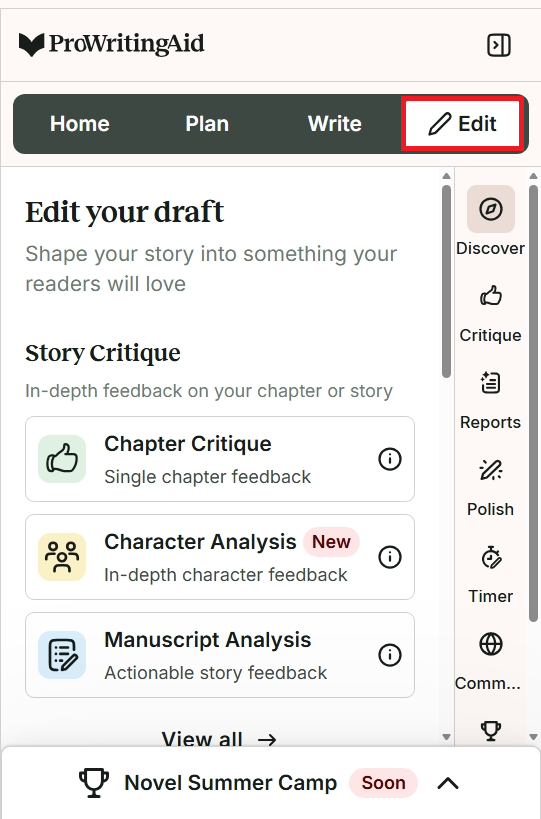
Click on “Edit” mode in the top panel.
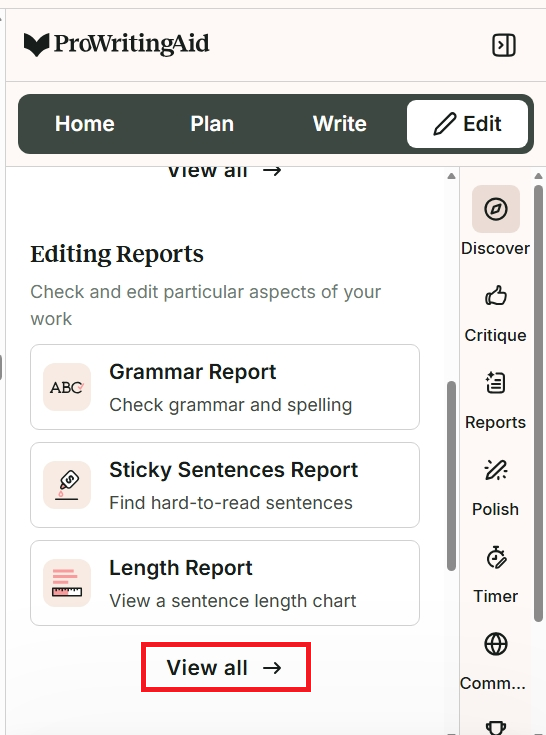
In the menu, scroll down to the “Editing Reports” section and click “View all.”
A new menu will appear that shows all editing reports. Click on “Readability.”
The Readability Report will run. Under the title “Readability,” you will see a list that shows:
- The estimated reading time of the text.
- An overview of how easy the document is to read.
- How many paragraphs are easy to read. The report will underline these paragraphs in green in the text.
- How many paragraphs are slightly difficult to read. The report will underline these paragraphs in yellow in the text.
- How many paragraphs are very difficult to read. The report will underline these paragraphs in red in the text.
We have shown this list and how the report works in the image below.
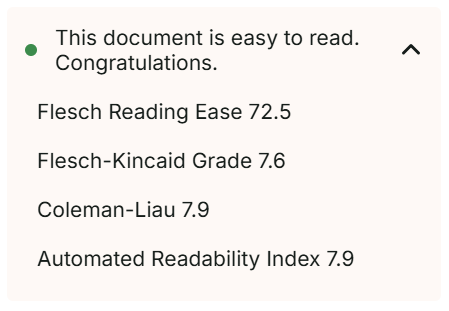
Click on the overview of how easy the document is to read to see a list of scores and grades for Flesch Reading Ease, the Flesch-Kincaid Grade, the Coleman-Liau Index, and the Automated Readability Index.
What is Flesch Reading Ease?
Flesch Reading Ease is related to the Flesch-Kincaid Grade. Flesch Reading Ease gives texts a score from 1 to 100, with 100 being the best readability.
What is the Flesch-Kincaid Grade?
The Flesch-Kincaid Grade is a readability tool. Rudolf Flesch and J. Peter Kincaid created the tool to test readability for the U.S. Navy. Flesch-Kincaid Grade gives texts a score from 0 to 18, with 0 being the easiest readability. The scores match grade levels, so a Flesch-Kincaid Grade 8 means the text is readable for a U.S. school Grade 8 or above reader.
What is the Coleman-Liau Index?
The Coleman-Liau Index is a readability test developed by Meri Coleman and T.L. Liau. It gives a score from 0 to 17, with 0 being the easiest readability. Like the Flesch-Kincaid Grade, the scores aim to match U.S. school grade levels.
What is the Automated Readability Index?
The Automated Readability Index is a readability test developed by E.A. Smith and R.J. Senter. It gives a score from 0 to 14, with 0 being the easiest readability. Its scores also aim to match U.S. school grade levels.
Which score should I look at first?
Start with the Flesch-Kincaid Grade. It gives you a US school grade, which is the easiest result to compare with your readers. The Coleman-Liau Index and the Automated Readability Index also give grades, so you can use them as a second opinion. It's normal for the scores to differ by a grade or so, because each formula measures slightly different things.
What score should I aim for?
Use this table as a guide, not a rule. Good stories can sit outside these ranges. In the US, a reader's grade is roughly their age minus five.
| If you're writing for | Reader age | Flesch-Kincaid Grade to aim for |
|---|---|---|
| Early chapter books | 6 to 8 | about 1 to 3 |
| Middle grade | 8 to 12 | about 3 to 7 |
| Young adult | 12 and up | about 5 to 9 |
| Adult fiction |
|
about 6 to 9 |
These ranges overlap, because books for neighbouring age groups often read at similar levels.
What the Readability Report can't tell you
The scores can't tell you whether your themes, tone or word choices suit a particular age group, so two books for very different readers can score the same. The report shows the four scores above, and doesn't currently show other scales such as Lexile levels. Reading your work aloud, or asking a reader from your audience, is a good way to check what the scores can't.
How to jump to each listed paragraph in your text
Click on each type of readability difficulty in the list. Then hover over the starting words of each paragraph listed to select from a small icon menu as shown in the image below.

Click on the eye icon to hide underlining for this type of paragraph. You can click on it again to show the underlining again.
Click on the arrow to jump to this paragraph in your text.
How to use the analysis in the Readability Report
The Readability Report scores are based on factors such as sentence length, vocabulary, syllable count, and character count. The report will help you spot paragraphs and passages that are difficult to read. It doesn’t provide suggestions for rewriting paragraphs, but you can try editing them to make improvements. For example, you can:
- Split long sentences into two shorter ones.
- Swap long or unusual words for shorter, simpler ones.
- Break a long paragraph into smaller ones.
Readability matters because you don’t want your writing to get in the way of your story or characterization. Using the Readability Report can help you work out what needs extra polish to keep your writing crystalline. If you'd like help rewriting a paragraph, you can also use Sparks to improve your readability.
To find out more, watch our video about the Readability Report:
ProWritingAid is more than just an editing assistant; we’re here to help you bring your story to life. Unlock your story’s full potential with our in-depth writing reports, actionable feedback, and more.